
ENTRY 01 ·
Building an AI for the real world
The first project in living in a cat world: give an AI a way to see and physically use an iPhone, and document the build in the open.
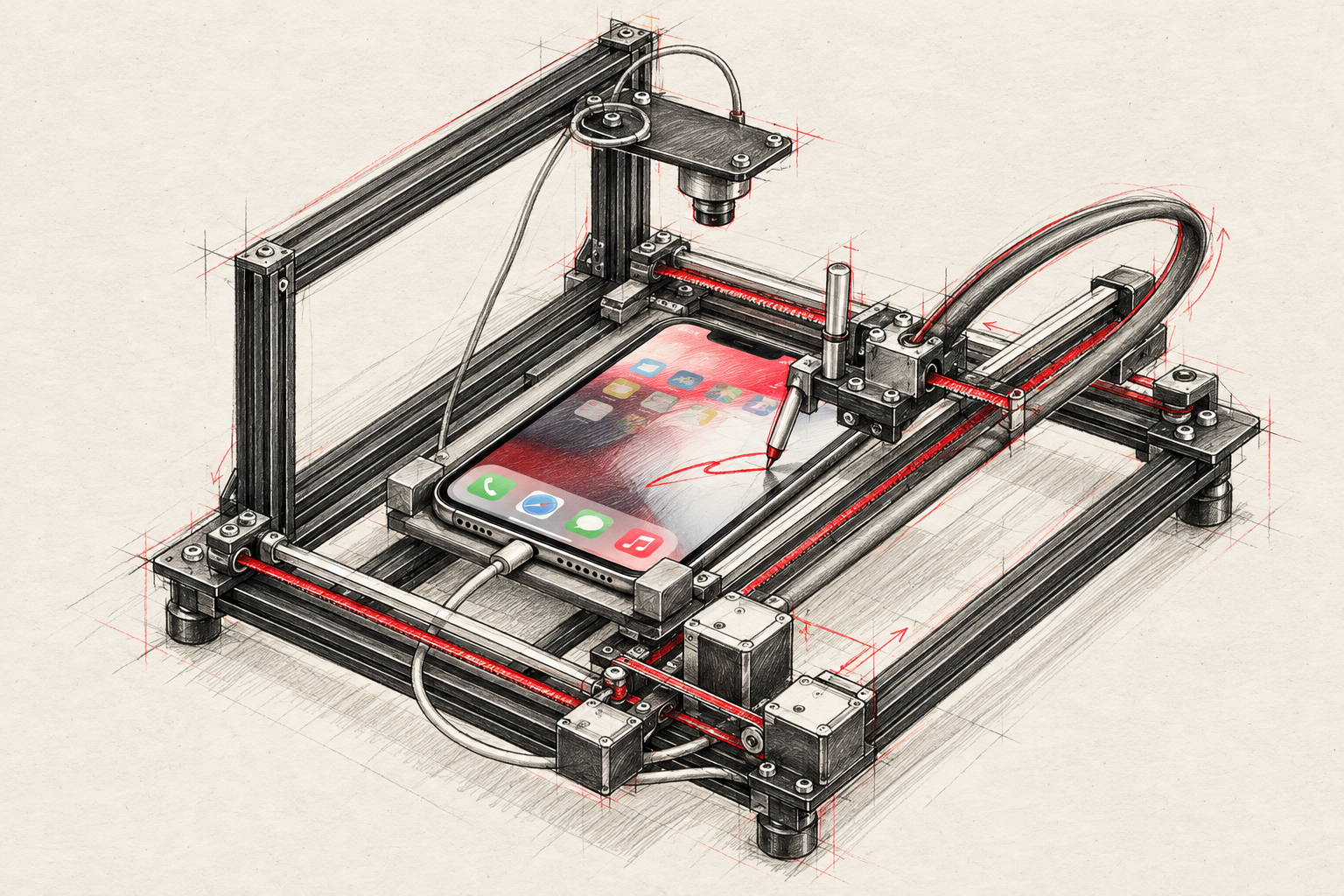
We’re building an AI that can perceive the real world and act within it: the world we share with people, cats and everyday objects.
The first project gives that goal a concrete starting point: an AI that can see an iPhone screen, decide what to do, and physically use it. A camera will be its eyes. A two-axis robot will position a stylus over the screen, and an actuator will lower it to tap, hold or swipe.
This journal begins before the first assembly. People are supporting the project financially, and we want them to see what we buy, why we choose it, what it costs and what actually works. We will also share files that others can study, reuse and improve.
Starting point: CAD design prepared and purchases started, now paused while we organize this documentation. We have not yet printed, assembled or physically tested the robot.
What we’re building toward
The first goal is to reach every useful area of the screen and perform one-finger gestures: a single tap, double tap, long press, swipe and drag. We will then connect those actions to an AI observation-and-decision loop.
The planned sequence is capture an image → locate the screen and interface elements → choose an action → move and touch → capture another image → check the result. A Raspberry Pi will coordinate the camera and application. A motion controller will execute the movement. The AI model may require an external API; its usage cost has not been measured or included in the hardware quotes.
There will be one contact point. It cannot perform simultaneous two-finger gestures such as pinch-to-zoom. Side buttons, Face ID, credential entry and other interactions outside the touchscreen are not solved by this mechanism.
How we plan to build it
The foundation is a CoreXY mechanism with two motors, belts and linear rails. The phone stays secured on a bed. The stylus moves above it and a solenoid produces contact. Our camera will be mounted on an external desk arm. The illustration on the home page is a concept sketch, not a photograph of a completed build.
| Assembly | Initial selection | Purpose |
|---|---|---|
| Phone | Unlocked, refurbished iPhone 14, 128 GB | Test device |
| Printing | Bambu Lab X2D AMS Combo and PETG | Make brackets, bed, joints and adapters |
| Computer | Raspberry Pi 5, 4 GB, kit with cooling and storage | Camera, coordination and control application |
| Vision | EMEET C960 4K USB camera, arm and lamp | Observe the screen with stable positioning and lighting |
| Motion | Two NEMA 17 motors, DLC32 V2.1 and two TMC2209 drivers | Execute XY movement |
| Guidance | MGN9H: one 150 mm rail and two 250 mm rails | Guide the carriage and moving bridge |
| Frame | FramingTech slot-5 profiles, cut to length | Provide a rigid structure |
| Touch | Adafruit 412 12 V solenoid, 5648 driver and capacitive mesh tip | Lower and lift the contact point |
The bill of materials lists exact models, quantities and product links. Matching a product name is not enough: rail dimensions, mounting patterns, belt width and connectors must also fit this particular design.
What the printer will make
The initial release contains 16 designs for 22 installed printed parts, plus three fit coupons. It includes motor brackets, feet, the phone bed, XY joints, idler blocks, the solenoid cradle, a tip coupler and electronics mounts.
We will print the coupons first and check them against the actual components before printing the complete set. The printer does not replace the metal profiles, rails, screws, motors or reinforcement plates. Those components serve different mechanical functions.
The selected profiles are two 20×40 mm sections at 355 mm, two 20×40 sections at 190 mm, one 10×20 section at 185 mm and two 10×20 sections at 190 mm. Their fasteners are for slot 5. These dimensions describe this variant of the project.
Power and contact control
The Pi kit, 12 V machine and iPhone charger will have separate supplies. The 12 V actuator branch includes a manual switch and a 3 A fuse. Cutting that branch stops actuator power; logic may remain powered through USB. This manual cutoff is not a certified emergency-stop system.
The capacitive tip and its electrical reference require a real test on the phone. The solenoid is rated for intermittent operation. We will not assume that it can remain energized continuously for any gesture. Pulse timing, return behavior, force, temperature and time limits must be checked before automation. We will not present wiring as final until the controller and driver connections have been verified.
Where the design comes from
The mechanical foundation derives from PhysiClaw, hardware v0.51, under the MIT license. We retain its original notice and document the attribution. Our variant adapts the structure and touch assembly to the selected components.
Digital work already includes geometry reviews, STL/STEP exports and representative mechanism positions. Those checks do not validate every possible trajectory, manufacturing tolerance, stiffness, temperature or touch recognition on a real phone. Our changes belong to this project; we do not attribute validation of these modifications to the original author.
The stages and what will count as progress
- Document the design. Publish the parts list, printable files, attribution and change record. This initial release covers that stage with explicit limits.
- Receive and inspect purchases. Compare models, quantities and dimensions. Record problems, substitutions and shipping costs. Shipped and delivered will remain separate states.
- Print and assemble. Fit coupons first, then final parts, frame, rails, belts, motors and electronics. Publish photographs and measurements of the actual build.
- Calibrate without contact, then with contact. Check travel, limits, stylus retraction and the camera-to-machine coordinate transformation. Begin with slow, supervised movements.
- Test gestures. Tap a screen grid including corners and edges; swipe in four directions; drag, double-tap and long-press. Record attempts, successes and failures alongside duration and temperature.
- Integrate the AI. Define structured actions, validate coordinates and timing, execute one action and observe again. Add retry limits and stop on failures. Extended unattended operation is a later milestone, not an assumed capability.
The reference software also uses iOS features such as Shortcuts and AssistiveTouch in certain workflows. Our camera-based goal does not imply that every app or screen will work without preparation. We will distinguish camera-only results from any additional operating-system assistance.
What we will publish
The available files include STL, editable STEP, manifests and CAD review records. Physical results, revised instructions and control code will follow as we develop them. The initial archive excludes manufacturers’ commercial models and does not yet include all scripts needed to regenerate the entire assembly parametrically from scratch.
The purchase record tracks every equipment line. Shipments show what we have verified in emails and order pages. Addresses, full order numbers, unredacted invoices and private tracking links stay outside the public repository.
We will document mistakes too: a part that does not fit, a payment that needs attention, a changed price or a failed gesture. For the people supporting the project, that information is part of the result. For someone building their own version, it may be the most useful documentation we produce.